Building optimistic UI in Rails powered by Turbo
A while back I showed you how to build optimistic UI using custom elements. It worked great! And you thought too, it was shared far and wide (it was readseen by many thousands!).
Something like this (no, really, this is not the same gif as the one from the custom elements article):
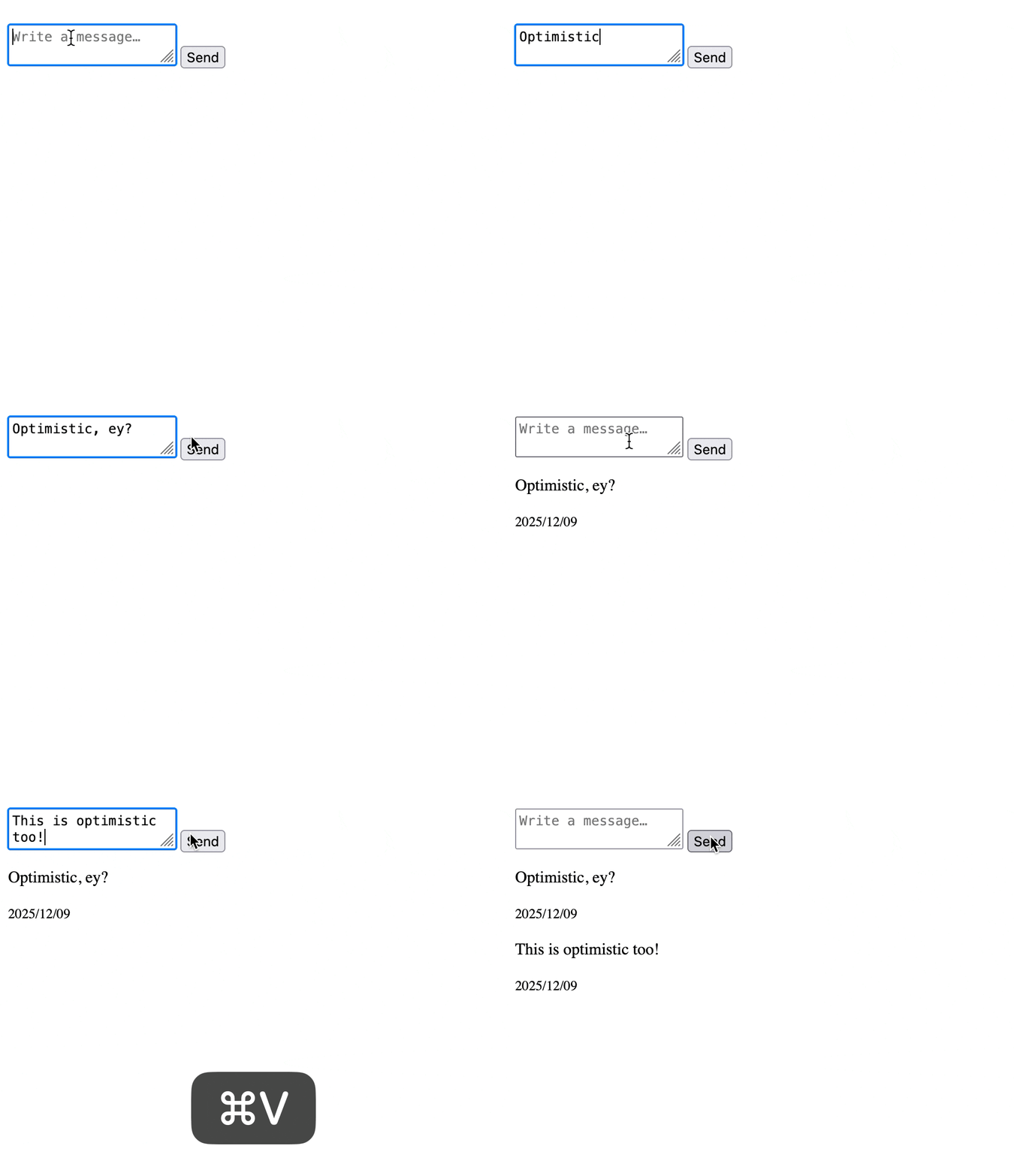
But something bugged me. The custom element wrapper felt like extra ceremony. What if I could get the same instant feedback without the extra markup? Just a form, some data attributes (Rails developers ❤️ data attributes) and a sprinkle of (custom) JavaScript? 😊
Guess what? You can! And it is even simpler. 🎉
The code is available on GitHub (see the last commit).
The custom element approach looked like this:
<optimistic-form>
  <form action="<%= messages_path %>" method="post">
    <%= text_area_tag "message[content]", nil, placeholder: "Write a message…", required: true %>

    <%= submit_tag "Send" %>
  </form>

  <template response>
    <%= render Message.new(content: "", created_at: Time.current) %>
  </template>
</optimistic-form>
That <optimistic-form> wrapper is extra markup. The template lives inside it. You need to define the custom element, register it, manage its lifecycle. Not too bad, but it is not exactly lightweight.
What if you could just mark the form itself as optimistic?
Adding data attributes
Here is what the new version looks like:
<%= form_with model: @message,
              data: {
                optimistic: true,
                optimistic_target: "messages",
                optimistic_template: "message-template",
                optimistic_position: "prepend"
              } do |form| %>
  <%= form.text_area :content, placeholder: "Write a message…", required: true %>

  <%= form.submit "Send" %>
<% end %>

<template id="message-template">
  <%= render Message.new(content: "", created_at: Time.current) %>
</template>

<div id="messages">
  <%= render @messages %>
</div>
Just a regular form with some data attributes. The template lives separately (you can put it anywhere). Everything is explicit through data attributes.
The JavaScript listens for Turbo’s submit-start event on any form marked with data-optimistic="true". When fired, it clones the template, populates it with the form data and then inserts it into the target. Cool, right?!
So how is this version working? Just a plain, old javascript class, really!
// app/javascript/optimistic_form.js
class OptimisticForm {
  static start() {
    document.addEventListener("turbo:submit-start", (event) => this.#startSubmit(event))
    document.addEventListener("turbo:submit-end", (event) => this.#endSubmit(event))
  }

  // private

  static #startSubmit(event) {
    const form = event.target

    if (!this.#isOptimistic(form)) return
    if (!form.checkValidity()) return

    const formData = new FormData(form)
    const element = this.#build({ form, with: formData })

    this.#insert({ element, into: form })
  }

  static #endSubmit(event) {
    const form = event.target

    if (!this.#isOptimistic(form)) return

    form.reset()
  }

  static #isOptimistic(form) {
    return form.dataset.optimistic === "true"
  }

  static #build({ form, with: formData }) {
    const template = this.#findTemplate(form)
    const element = template.content.cloneNode(true).firstElementChild

    this.#populate({ element, with: formData })

    return element
  }

  static #findTemplate(form) {
    const selector = form.dataset.optimisticTemplate

    return document.getElementById(selector)
  }

  static #populate({ element, with: formData }) {
    for (const [name, value] of formData.entries()) {
      const field = element.querySelector(`[data-field="${name}"]`)

      if (field) field.textContent = value
    }
  }

  static #insert({ element, into: form }) {
    const target = this.#findTarget(form)
    const position = form.dataset.optimisticPosition || "append"

    if (position === "prepend") {
      target.prepend(element)
    } else {
      target.append(element)
    }
  }

  static #findTarget(form) {
    const selector = form.dataset.optimisticTarget

    return document.getElementById(selector)
  }
}

OptimisticForm.start()

export default OptimisticForm
(do not forget to import it in your entrypoint)
So how does class work? It is entirely static. No instances needed (if that sounds foreign to you, I suggest checking out JavaScript for Rails Developers). It sets up two listeners for Turbo-powered events: turbo:submit-start and turbo:submit-end.
When a form submits, check if it has data-optimistic="true". If not, ignore it. If yes, grab the form data, clone the template, populate the fields and insert it into the target.
The #build method does this heavy lifting:
static #build({ form, with: formData }) {
  const template = this.#findTemplate(form)
  const element = template.content.cloneNode(true).firstElementChild

  this.#populate({ element, with: formData })

  return element
}
The #populate method loops through the form data and updates any element with a matching data-field attribute:
static #populate({ element, with: formData }) {
  for (const [name, value] of formData.entries()) {
    const field = element.querySelector(`[data-field="${name}"]`)

    if (field) field.textContent = value
  }
}
This is the same technique from the custom element version. Your partial needs data-field attributes on the elements you want to populate:
<article class="message" id="<%= dom_id(message) %>">
  <p data-field="message[content]"><%= message.content %></p>

  <small><%= message.created_at.strftime("%Y/%m/%d") %></small>
</article>
The #insert method handles positioning. You can prepend or append (default):
static #insert({ element, into: form }) {
  const target = this.#findTarget(form)
  const position = form.dataset.optimisticPosition || "append"

  if (position === "prepend") {
    target.prepend(element)
  } else {
    target.append(element)
  }
}
Then there is the #endSubmit method to reset the form after submission completes. This gives instant feedback. The user types a message, hits send, the message appears in the list and the form clears. All before the server responds. ⚡
You could handle this with a Turbo Stream instead, but keeping it in the JavaScript feels cleaner. It is part of the optimistic UX, so it belongs with the optimistic code.
Product-minded Rails notes
Monthly roundup on what I am building, open source work and recent articles like this one.
On writing JavaScript well
One thing I really like about this implementation is the named parameters:
const element = this.#build({ form, with: formData })

this.#insert({ element, into: form })
this.#populate({ element, with: formData })
These read like real sentences. 🤓 “Build an element with form data.” “Insert element into form.” “Populate element with form data.” JavaScript destructuring makes this possible:
static #build({ form, with: formData }) {
  // …
}
The with: formData syntax renames the parameter from with (a reserved word) to formData inside the function. It is a small detail but it makes the code much more readable.
It is something I write about in my by JavaScript for Rails Developers.
Why static methods?
You might wonder why everything is static. Why not create instances? You could do this:
static start() {
  document.addEventListener("turbo:submit-start", (event) => {
    if (form.dataset.optimistic === "true") new OptimisticForm(event.target)
  })
}

constructor(form) {
  this.form = form
  // … handle submission
}
But for this use case, instances add complexity without much benefit. We are not managing state. We are not tracking multiple submissions. We are just doing some DOM manipulation and moving on.
Static methods keep it simple. The class is really just a namespace for related functions. And that is okay! Not everything needs to be an instance.
The use cases are the same as the custom element’s one, but this solution feels more Rails-like: add data-optimistic="true" to your form, point it at a template and target and you are off to the races.
Pretty cool, right? Let me know below if you try it or have questions! ❤️
Want to read me more?
-
Building optimistic UI in Rails (and learn custom elements)
Learn how custom elements work in Rails by building an optimistic form. From simple counters to instant UI updates, understand when to use custom elements over Stimulus controllers. -
Inline editing with custom elements in Rails
Learn how to build an inline editing feature using custom elements in Rails. A clean, framework-agnostic approach to editable content with just HTML and JavaScript. -
Nested forms without `accepts_nested_attributes_for` in Rails
Build nested forms in Rails without accepts_nested_attributes_for. Use separate forms with auto-save and Turbo Streams for a simpler solution.
Over to you…
What did you like about this article? Learned something knew? Found something is missing or even broken? 🫣 Let me (and others) know!
Comments are powered by Chirp Form
{{comment}}