Distort HTML with SVG's feDisplacementMap
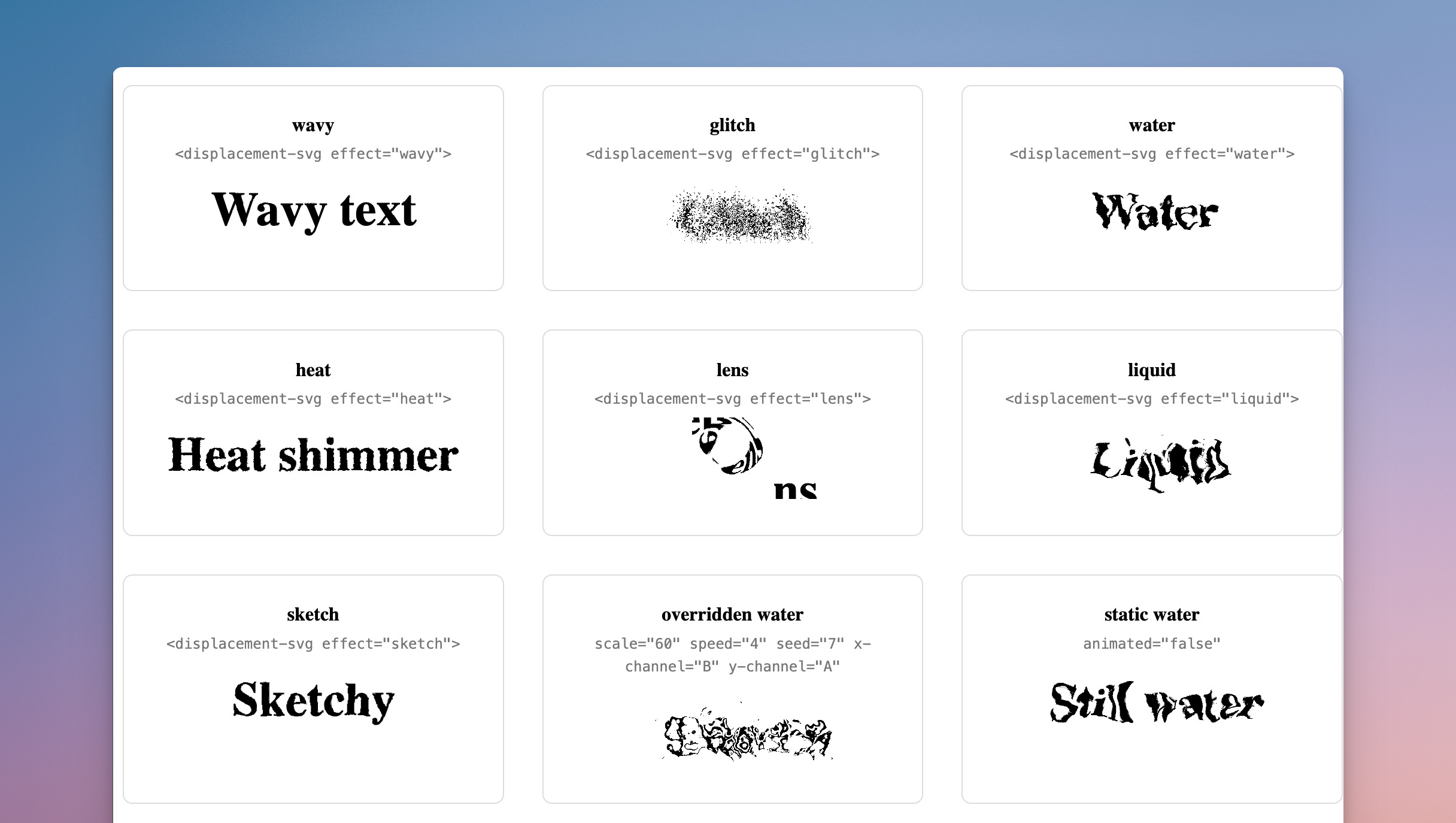
Look at those text effects: wow would you build them?
My first answer, somewhere in the 2000s, would have been Flash. A timeline, some easing curves, spooky rippling text for every band MySpace page. 🤘 After Flash came many other options: jQuery plugins, canvas pixel picking, shaders in a giant WebGL library for one ripple of text.
Luckily today all you need fits in two SVG primitives and one line of CSS.
For a while now, you can apply SVG filters to regular HTML:
filter: url(#my-filter)
The browser then renders your element through that filter. And SVG filters can do wild things. The wildest of all: feDisplacementMap.
How feDisplacementMap works
Here’s how feDisplacementMap works. It takes two images. The first one is your content (SourceGraphic, in filter-speak). The second one is a map. For every pixel of your content, the filter reads the color at that position in the map, converts one of its channels to a number between 0 and 1, and shifts the pixel sideways by:
scale * (channelValue - 0.5)
So a red channel value of 0.5 (neutral gray) means “don’t move this pixel”. A value of 1.0 pushes it scale pixels to the right (if you used Photoshop’s distort effect this might be familiar). A value of 0 pulls it back the other way.
This means the real work goes into the map, and you can build that map from anything. The workhorse for organic distortion is feTurbulence: it generates Perlin-style noise, a soft cloud of grays and colors, and that becomes your map. Chain the two primitives and you get distortion for free.
Your first distortion
Enough theory. This is the full setup (and below, real examples!):
<svg width="0" height="0" style="position: absolute">
  <defs>
    <filter id="fd-wavy">
      <feTurbulence type="turbulence" baseFrequency="0.02" numOctaves="2" result="map"/>

      <feDisplacementMap in="SourceGraphic" in2="map" scale="20"/>
    </filter>
  </defs>
</svg>
Look at that! No JavaScript, no canvas, but real text you can select. 🤯 The result="map" names the turbulence output, and in2="map" pipes it into the displacement (you’ll also see xChannelSelector and yChannelSelector on feDisplacementMap; more on those in a second).
Turn the dials
Two attributes control almost everything: baseFrequency on the turbulence and scale on the displacement.
baseFrequency picks the size of the noise blobs. Low values give you big, slow waves. High values give you fine, nervous grain:
scale picks how far pixels travel. Keep it small for a subtle wobble, crank it up and your text melts:
A few more dials worth knowing:
-
numOctaveslayers noise on top of noise. More octaves, more detail. -
seedproduces a different noise pattern. Great when you want variants that look related (but differ). -
xChannelSelector/yChannelSelectorset which color channel drives horizontal and vertical shifts. The defaults areRandG. PointyChannelSelectoratAand the vertical shift follows the noise’s alpha channel instead. This is how you design maps where X and Y move independently.
Get more than 200 Rails UI Components
Rails Designer's UI components is an UI components libraray used by 1,000+ developers globally to build their next project.
Move it
A static distortion is nice, but you can use SVG’s own <animate> to, for example, wobble the turbulence’s baseFrequency over time:
<feTurbulence type="turbulence" baseFrequency="0.02" numOctaves="2" result="map">
  <animate attributeName="baseFrequency"
           dur="6s" repeatCount="indefinite"
           values="0.02;0.04;0.02"/>
</feTurbulence>
Animating scale instead gives you a pulse. Animate both baseFrequency and scale and you get heat shimmer off a summer road.
Any image can be a map
My favorite part? The map is just an image. So swap feTurbulence for feImage and feed in any picture. A smooth radial gradient, for example, gives you a lens. One catch: feImage inside filters applied to plain HTML behaves unreliably across browsers, so I render the word inside an inline <svg> instead. Works everywhere:
<svg width="240" height="100">
  <defs>
    <filter id="fd-lens" filterUnits="userSpaceOnUse" x="0" y="0" width="240" height="100">
      <feImage href="data:image/svg+xml,…" x="0" y="0" width="240" height="100" result="m"/>
      <feDisplacementMap in="SourceGraphic" in2="m" scale="40"/>
    </filter>
  </defs>
  <text x="120" y="64" text-anchor="middle" filter="url(#fd-lens)">lens</text>
</svg>
(Grayscale in the middle, white at the edges: pixels near the center stay put, pixels near the edge get pushed outward.)
And once you accept “the map is an image”, you are only limited to your imagination. Feed in a photo, a QR-looking pattern (instant glitch) or a feColorMatrix on top of turbulence. The displacement filter does exactly what the map tells it to. Design the map, design the distortion.
Try it yourself
I’ve wrapped these ideas in a tiny custom element, <displacement-svg>, with seven presets (wavy, glitch, water, heat, lens, liquid, sketch) and attributes to override every dial. As always, the code can be found on GitHub.
Combine feDisplacementMap with feBlend for water-on-glass (to get that iOS’ liquid glass effect 💡). The MDN docs for feDisplacementMap are another great resource.
Want to read me more?
-
Inline SVG Icons in Your Rails App
Explore the advantages of using SVG formats for icons in Rails apps. Learn how to enhance icon attributes with simple Ruby helpers and integrate any icon library seamlessly. Discover how the Rails Icons gem can simplify your SVG implementation for a cleaner, more adaptable UI. -
Favicons in Rails Apps (updated for 2025)
Adding favicons to your Rails app doesn't have to be hard. Just follow these steps to add them in minutes. -
Preview an Image Before Upload with Hotwire/Stimulus
Learn about JavaScript's FileReader interface to preview user images before they are upload with Hotwire/Stimulus.
Over to you…
What did you like about this article? Learned something knew? Found something is missing or even broken? 🫣 Let me (and others) know!
Comments are powered by Chirp Form
{{comment}}