Building a quiz with Stimulus
Quizzes are a fun! Well… I do think they are. Always up to learn new things. So how can you create one in with your favorite frameworks? In this article, I want to show how you can build a quiz witg Stimulus. It can be a good starting point for learn about a new customer in your SaaS or as a smart, little marketing tool (keep readers engaged/on your page). 💡
The quiz loads questions from a Rails endpoint, tracks answers in real-time, calculates results and submits them to your server. As always, the code can be found on GitHub.
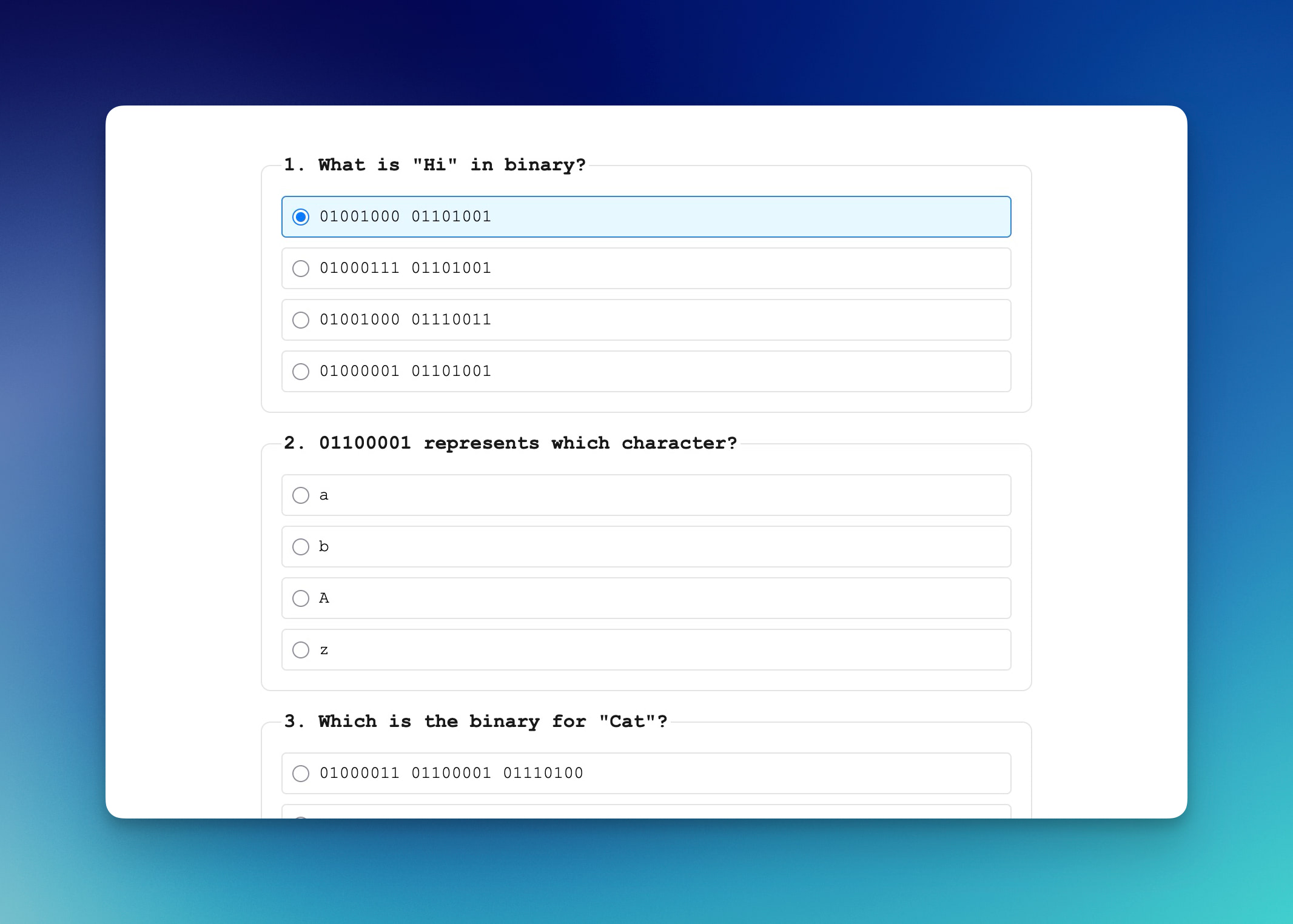
This will be the result. Time to dust off that good ol’ computer science knowledge… 🤓
Building the data class
Here’s the QuizData class that handles the quiz logic. For this example it lives inside the Stimulus controller, but you can organise it however you want.
class QuizData {
  constructor(questions) {
    this.questions = questions
    this.answers = {}
  }

  answer(questionIndex, selectedOption) {
    this.answers[questionIndex] = selectedOption
  }

  getAnswer(questionIndex) {
    return this.answers[questionIndex]
  }

  correctCount() {
    return this.questions.filter((question, questionIndex) => {
      const answer = this.answers[questionIndex]
      return answer !== undefined && answer === question.correct
    }).length
  }

  result() {
    return this.questions.reduce((accumulate, question, questionIndex) => {
      const answer = this.answers[questionIndex]

      return accumulate + ((answer === question.correct) ? Math.pow(2, this.questions.length - 1 - questionIndex) : 0)
    }, 0)
  }

  get totalQuestions() {
    return this.questions.length
  }

  get isComplete() {
    return Object.keys(this.answers).length === this.totalQuestions
  }

  static default() {
    return new QuizData([
      {
        question: "What is \"Hi\" in binary?",
        options: ["01001000 01101001", "01000111 01101001", "01001000 01110011", "01000001 01101001"],
        correct: 0
      },

      // more questions…
    ])
  }
}
This class provides methods to record answers, checks if all questions are answered and calculate the score and encode results. The result() method is a little bit clever, it encodes which questions were answered correctly as a binary number, making it easy to store and analyze results server-side.
The static default() method provides quiz data if you do not have a remote endpoint so you can use it also outside of a Rails app (in a static site, for example).
The Rails endpoint
Your quiz questions need to come from somewhere. Create a QuizzesController with an index action that returns questions as JSON:
class QuizzesController < ApplicationController
  def index
    render json: {
      questions: [
        {
          question: "What is \"Hi\" in binary?",
          options: ["01001000 01101001", "01000111 01101001", ...],
          correct: 0
        },

        # etc…
      ]
    }
  end

  def create
    Rails.logger.info "Quiz submission: #{params.permit!.to_h}"

    head :ok
  end
end
The index action returns an array of questions with their options and the index of the correct answer. The create action receives the submitted answers, you can process them here however you want (send along, store in DB, etc.).
Product-minded Rails notes
Monthly roundup on what I am building, open source work and recent articles like this one.
The Stimulus controller
Now the Stimulus where it all happens 🛏️✨. This controller fetches questions from your endpoint, renders them and handles user interactions. It uses the @rails/request.js library to make clean HTTP requests.
When the controller connects, it fetches the questions:
async connect() {
  this.quiz = await this.#getQuestions()

  this.#render()
}

async #getQuestions() {
  if (this.hasQuestionsEndpointValue) {
    try {
      const response = await get(this.questionsEndpointValue, { responseKind: "json" })

      if (response?.questions?.length > 0) return new QuizData(response.questions)
    } catch (error) {
      console.warn("Failed to load questions from endpoint, using defaults:", error)
    }
  }

  return QuizData.default()
}
This check this.hasQuestionsEndpointValue is added so I can use this controller also outside of a Rails app.
When a user selects an answer, the controller records it and enables the submit button (when all questions are answered):
selectAnswer(event) {
  const optionsContainer = event.target.closest("[data-quiz-question-index]")
  const questionIndex = parseInt(optionsContainer.dataset.quizQuestionIndex, 10)
  const selectedOption = parseInt(event.target.value, 10)

  this.quiz.answer(questionIndex, selectedOption)
  this.submitTarget.disabled = !this.quiz.isComplete
}
When the user submits the quiz, the controller sends the answers and result to your Rails endpoint. For details on how @rails/request.js works and how to make GET and POST requests from a Stimulus controller, check out this article 😊. What is happening is that you’re sending structured data (answers and a calculated result) to your server:
async submit() {
  const payload = {
    answers: this.quiz.answers,
    result: this.quiz.result()
  }

  if (this.hasAnswersEndpointValue) {
    await post(this.answersEndpointValue, {
      body: JSON.stringify(payload)
    })
  }

  this.#showResults()
}
After submission, the controller displays the results and hides the quiz:
#showResults() {
  const correct = this.quiz.correctCount()
  const total = this.quiz.totalQuestions

  const fieldsets = this.element.querySelectorAll("fieldset")
  fieldsets.forEach(fieldset => fieldset.remove())

  this.resultsTarget.innerHTML = `<div>${correct} out of ${total} correct</div>`
  this.submitTarget.hidden = true
}
The HTML view is minimal:
<article data-controller="quiz" data-quiz-questions-endpoint-value="<%= quizzes_path %>" data-quiz-answers-endpoint-value="<%= quizzes_path %>">
  <output data-quiz-target="results"></output>

  <button type="button" data-quiz-target="submit" data-action="quiz#submit" disabled>Submit Quiz</button>
</article>
The controller renders each question as a fieldset with radio buttons. The styling uses modern CSS (oklch color space; see this article, CSS Grid) to create a clean, accessible interface. The CSS isn’t included here, but it handles the layout, hover states and checked states for the radio buttons.
This quiz is a good starting point. You could add pagination to show only a few questions at a time, add a countdown timer that auto-submits when time runs out, send detailed results to an analytics service to track which questions trip up your users, allow retakes so users can compare scores over time or fetch different question sets based on difficulty level.
Want to read me more?
-
Nested Forms With Turbo (without dependencies)
Nested forms with Rails can now be done without using any third-party gem! Turbo Stream's is all you need to add nested fields to any form you want. -
Adding edit, delete and reposition for nested forms in Rails with Stimulus
The next level for nested forms with Stimulus: add edit, delete and drag-and-drop reposition features. -
Building Nested Forms in Rails with Stimulus
Adding nested forms in Rails is easy enough with Stimulus, no third-party gems, like Cocoon, needed.
Over to you…
What did you like about this article? Learned something knew? Found something is missing or even broken? 🫣 Let me (and others) know!
Comments are powered by Chirp Form
{{comment}}