Nested forms without `accepts_nested_attributes_for` in Rails
Recently I had to build a form builder again. You know the one: update some attributes for the form and then a customizable set of form fields, like text fields, email fields and text areas. All with their own validations, settings and so on. It turned out like this:
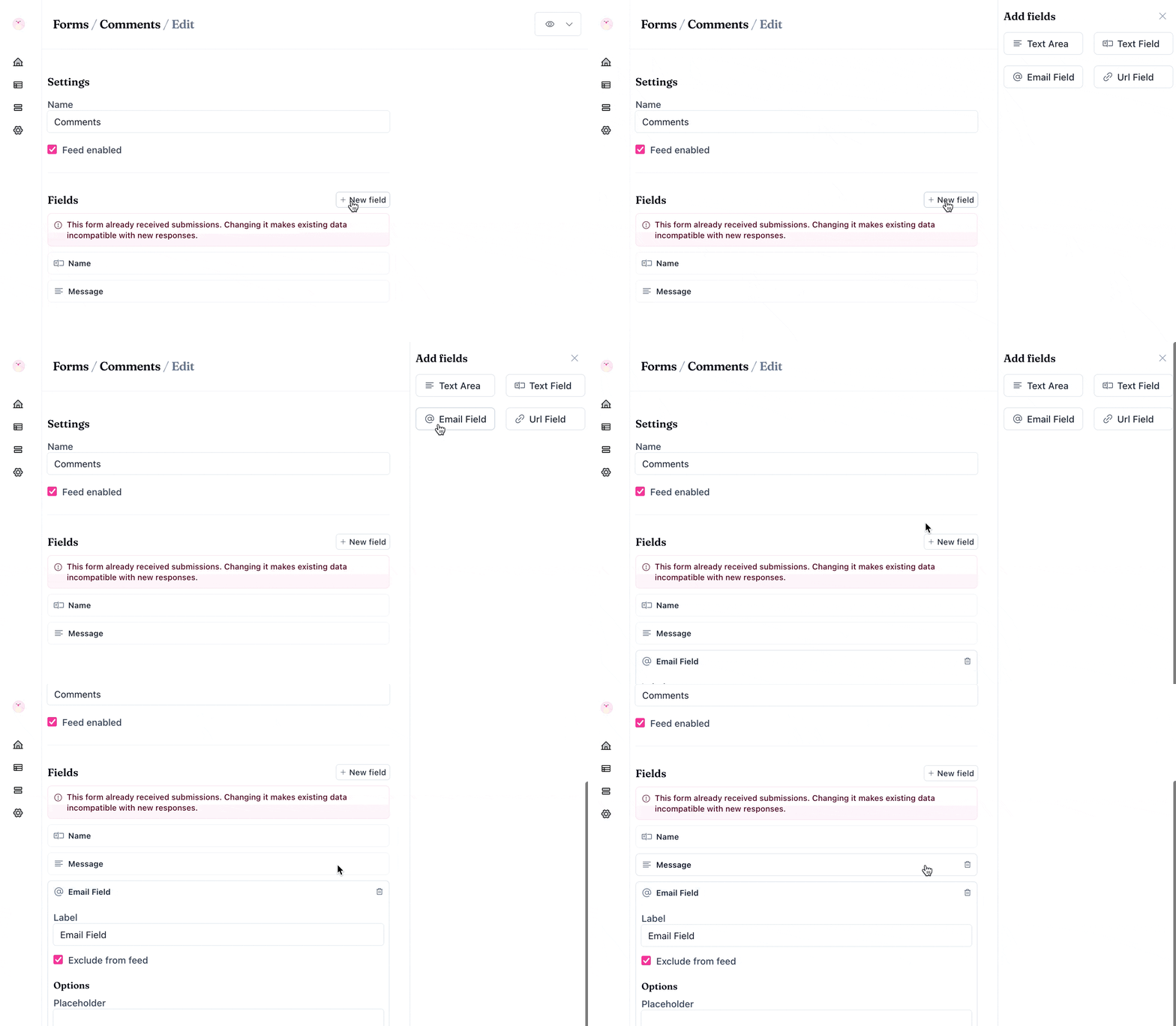
Initially I thought of building it using Rails’ accepts_nested_attributes_for (like I wrote about here), but I quickly opted out of that and instead had a simpler idea for it. Some ideas are so simple that I feel almost embarrassed to publish about it. But over the years I’ve found that the most simple ideas will still delight plenty of people.
So here is a way to have “nested forms” in Rails without accepts_nested_attributes_for.
As often is the case, the code can be found on GitHub. It doesn’t look as polished as the example in the Gif above, but it uses essentially the same logic under the hood.
Start with the basic models. A Form has many Fields. Each field uses Single Table Inheritance (STI) to handle different field types:
# app/models/form.rb
class Form < ApplicationRecord
  has_many :fields, class_name: "Form::Field"
end

# app/models/form/field.rb
class Form::Field < ApplicationRecord
  belongs_to :form

  TYPES = %w[Form::Field::TextArea Form::Field::TextField]

  def self.model_name = ActiveModel::Name.new(self, nil, "Field")

  def to_partial_path = "forms/field"
end

# app/models/form/field/text_field.rb
class Form::Field::TextField < Form::Field
end

# app/models/form/field/text_area.rb
class Form::Field::TextArea < Form::Field
end
The model_name override keeps URLs clean (/forms/1/fields instead of /forms/1/form_fields). The to_partial_path allows to render all field types with a single partial.
Next, the migrations:
# db/migrate/20251209080000_create_forms.rb
class CreateForms < ActiveRecord::Migration[8.1]
  def change
    create_table :forms do |t|
      t.string :name

      t.timestamps
    end
  end
end

# db/migrate/20251209080030_create_form_fields.rb
class CreateFormFields < ActiveRecord::Migration[8.1]
  def change
    create_table :form_fields do |t|
      t.belongs_to :form, null: false, foreign_key: true
      t.string :type
      t.string :label

      t.timestamps
    end
  end
end
Run the migrations and seed a form:
# db/seeds.rb
Form.create name: "My first form"
Easy does it!
Now onto building the edit page. This is where it happens. Instead of one big form with nested attributes, it will be separate forms for the parent and each field. Say what?! 🤯
<%# app/views/forms/edit.html.erb %>
<%= form_with model: @form, id: dom_id(@form, :form) do |form| %>
  <%= form.label :name %>
  <%= form.text_field :name, data: {action: "form#submit", target: "##{dom_id(@form, :form)}", submit_delay: 1500}%>

  <div>
    <%= form.submit hidden: true %>
  </div>
<% end %>

<%= tag.ol render(@form.fields), id: dom_id(@form, :fields) %>

<div>
  <p>
    Add new field:
  </p>

  <% Form::Field::TYPES.each do |type| %>
    <%= button_to type.delete_prefix("Form::Field::"), form_fields_path(@form), method: :post, params: { field: { type: type } } %>
  <% end %>
</div>
The form at the top handles the parent model. Simple. Below that are all existing fields rendered. At the very bottom just some buttons to add new fields of different types.
Notice the data-action attribute on the form’s name text field? That’s Attractive.js doing its thing. It’s a new library I released recently that lets you skip writing lots of typical Stimulus controllers (works great with your SSG too). Here it automatically submits the form after you stop typing for 1.5 seconds. Pretty neat! 🎯
This auto-save feature is what makes this whole technique possible. Without it, each field would need its own submit button, which would be weird and clunky.
Make sure to Attractive.js to your layout:
<%# app/views/layouts/application.html.erb %>
<head>
+  <script defer src="https://cdn.jsdelivr.net/npm/attractivejs"></script>
</head>
Onto rendering the form fields. Each field gets rendered with this partial:
<%# app/views/forms/_field.html.erb %>
<%# locals: (field:, form: field.form, open: false) %>
<%= tag.li id: dom_id(field) do %>
  <details <%= "open" if open %>>
    <summary>
      <%= field.label || "Unnamed" %>
    </summary>

    <%= form_with model: field, url: form_field_path(form, field), id: dom_id(field, :form) do |form| %>
      <%= form.label :label %>

      <%= form.text_field :label, data: {action: "form#submit", target: "##{dom_id(field, :form)}", submit_delay: "1500"} %>

      <%= form.submit hidden: true %>
    <% end %>
  </details>
<% end %>
Each field has its own form. That’s the key insight here. No nested attributes. No complex params parsing. Just simple forms that each know how to save themselves.
The <details> element gives us a collapsible UI for free. When you add a new field it opens automatically (via the open local). The summary shows the field label, or “Unnamed” if it’s fresh (it is not required, it is just to mimic the Chirp Form example from above).
Then just wire the views and models up with basic controllers, the routes and create turbo stream responses to update in place and you have nested forms in Rails without a headache! Huzzah! 🎉
Rails UI Components
More than 200 components used by 1,000+ developers globally.
Why this works
This approach works because each form is independent. The parent form saves the parent model. Each child form saves its own child model. No coordination needed. No complex params parsing. No accepts_nested_attributes_for set up (that you always mess up multiple times, admit it).
The auto-save feature really makes this work well. You type, you wait a moment and it saves. Boom! Sometimes the best solution is the one that doesn’t try to be too clever. 😊
Want to give it a try and see if this approach works for your next form builder?
Want to read me more?
-
Use Tailwind CSS with Your Rails Forms
Learn how to use Rails' FormBuilder API to easily use Tailwind CSS wih your Rails forms. -
Building Nested Forms in Rails with Stimulus
Adding nested forms in Rails is easy enough with Stimulus, no third-party gems, like Cocoon, needed. -
Better Inline Validation for Rails Forms (with ViewComponent or partials)
Rails has great features in place for form validations. But the UX can be improved. Provide immediate and contextual feedback by moving form validations closer to the input fields.
Over to you…
What did you like about this article? Learned something knew? Found something is missing or even broken? 🫣 Let me (and others) know!
Comments are powered by Chirp Form
{{comment}}