Introducing Turbo Transition: create smoother Turbo Streams
Ever wondered how to add more joy to components and partials injected or removed from the DOM? Something like this:
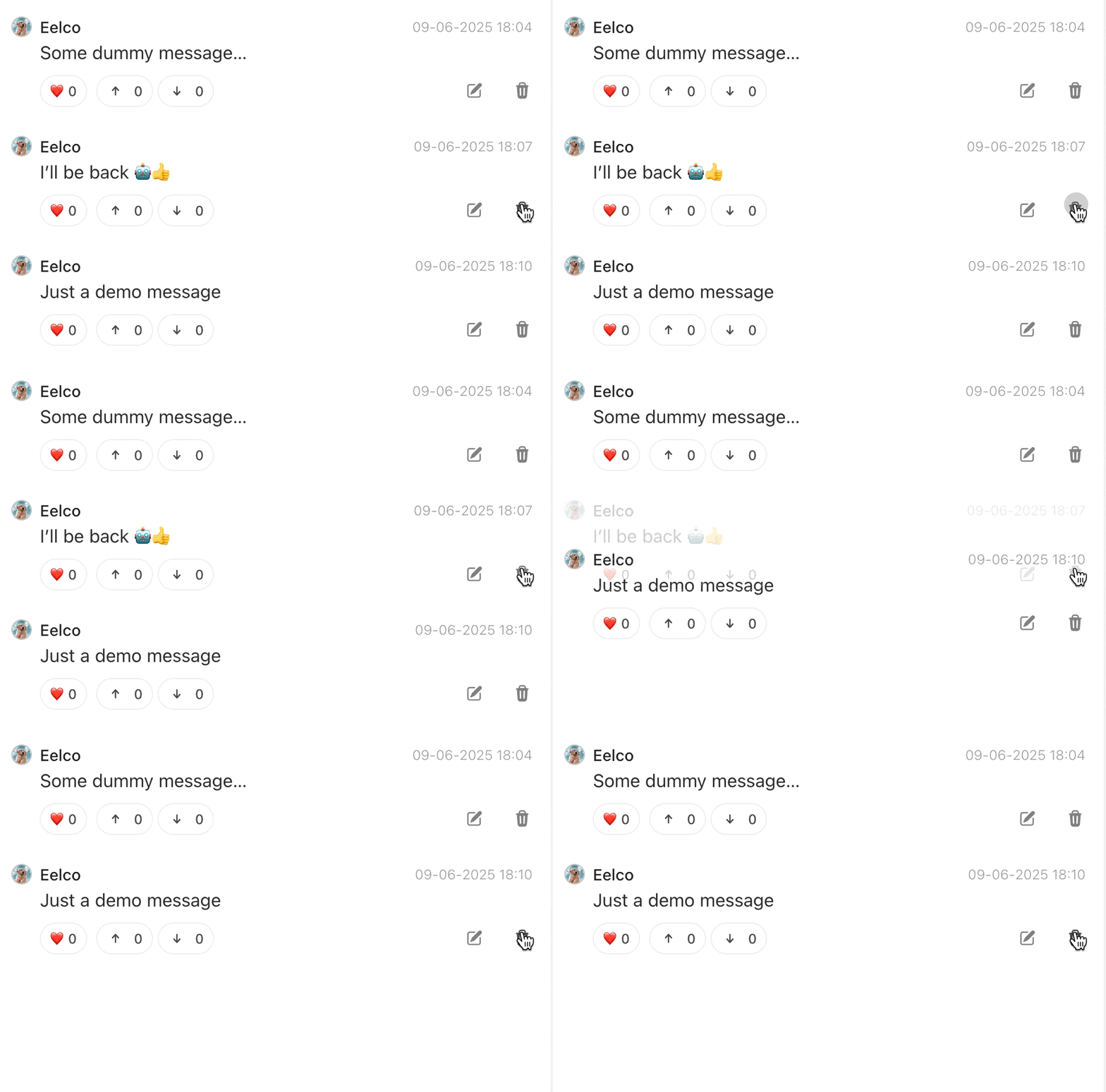
Previously I used a solution that relied on event callbacks from turbo. It did its job, but I was never really happy with the solution nor with its usage.
So I am introducing: Turbo Transition: A “minion” for Turbo-Frames and Streams that transitions elements as they enter or leave the DOM. ✨ A way simpler, but equally powerful solution than what I had before.
Since I’ve been working actively on Rails Designers I have been exploring all kinds of interesting techniques. Turbo Transition, just like turbo-frame and turbo-stream is nothing more than a custom element that adds and removes defined CSS classes.
Check it out for your nextcurrent Turbo-powered app.
Interested how Turbo Transition and custom elements work? Continue reading. 👇
How Turbo Transitions works
Turbo Transition is nothing more than a custom element. They let you create your own HTML tags with built-in behavior (like extending HTML’s vocabulary). Here’s the minimal setup:
class MyElement extends HTMLElement {
  // Called when element is added to the page
  connectedCallback() {
    // Element is now in the DOM
  }

  // Called when element is removed
  disconnectedCallback() {
    // Clean up time
  }
}

// Register so browsers know about the new element
customElements.define("my-element", MyElement);
Turbo Transition builds on this foundation to handle animations when elements enter or leave the page:
class TurboTransition extends HTMLElement {
  connectedCallback() {
    // Handle enter animations
  }

  remove() {
    // Handle leave animations
  }
}

customElements.define("turbo-transition", TurboTransition);
From here, it manages transition classes, timing and cleanup.
class TurboTransition extends HTMLElement {
  connectedCallback() {
    if (this.#config.hasEnterTransition()) {
      this.#enter();
    }
  }

  remove() {
    if (this.#config.hasLeaveTransition()) {
      this.#leave();

      return this;
    }

    return super.remove();
  }
}
The transition process is straightforward:
async #transition({ to, element = null }) {
  const target = element || this.firstElementChild;

  if (!target) return;

  const classes = this.#config.getClasses({ for: to });

  await this.#utilities.run(target, classes);
}
- Get the target element (Turbo Transition requires one child element inside it);
- Fetch the relevant classes from attributes (eg.
enter-from-class="fade-enter-from"); - Run the transition sequence.
The remove() method uses cloning to keep the animation visible while the original element is removed:
#leave() {
  const clone = this.cloneNode(true);
  const parent = this.parentNode;

  parent.replaceChild(clone, this);

  // Run transition on the clone's content
  this.#transition({ to: "leave", element: clone.firstElementChild })
    .then(() => clone.parentNode?.removeChild(clone));
}
Classes are applied in a specific sequence to create smooth transitions:
// utilities.js
async run(element, classes) {
  this.#applyInitialState(element, classes); // Add 'from' + 'active'

  await this.#nextFrame(); // Wait for browser

  this.#applyFinalState(element, classes); // Switch to 'to' state

  await this.#waitForCompletion(element); // Wait for animation

  this.#cleanup(element, classes); // Remove classes
}
This creates a reliable way to add smooth transitions to your components and elements that works seamlessly with Turbo Frames and Turbo Streams.
Check it out and give it that star! ⭐
Want to read me more?
-
Smooth Transitions with Turbo Streams
Add custom behavior to `turbo:before-stream-render` listener to add smooth transitions to turbo stream when adding and removing elements. -
Add a custom Tailwind CSS class for reusability and speed
Learn how to add a custom CSS class with Tailwind CSS' plugin system. -
How do Turbo Streams Work (behind the scenes)
Turbo Streams uses a few standard features around custom elements. available in any modern browsers. Learn how Turbo Streams work behind the scenes.
Over to you…
What did you like about this article? Learned something knew? Found something is missing or even broken? 🫣 Let me (and others) know!
Comments are powered by Chirp Form
{{comment}}